· News · 10 views
Pilgway Launches CADQuader Beta to Turn CAD Models Into Quad Meshes
Pilgway, the maker of 3DCoat, has opened a free public beta of CADQuader, which converts STEP and IGES CAD files into mostly quad meshes and includes a Blender bridge.
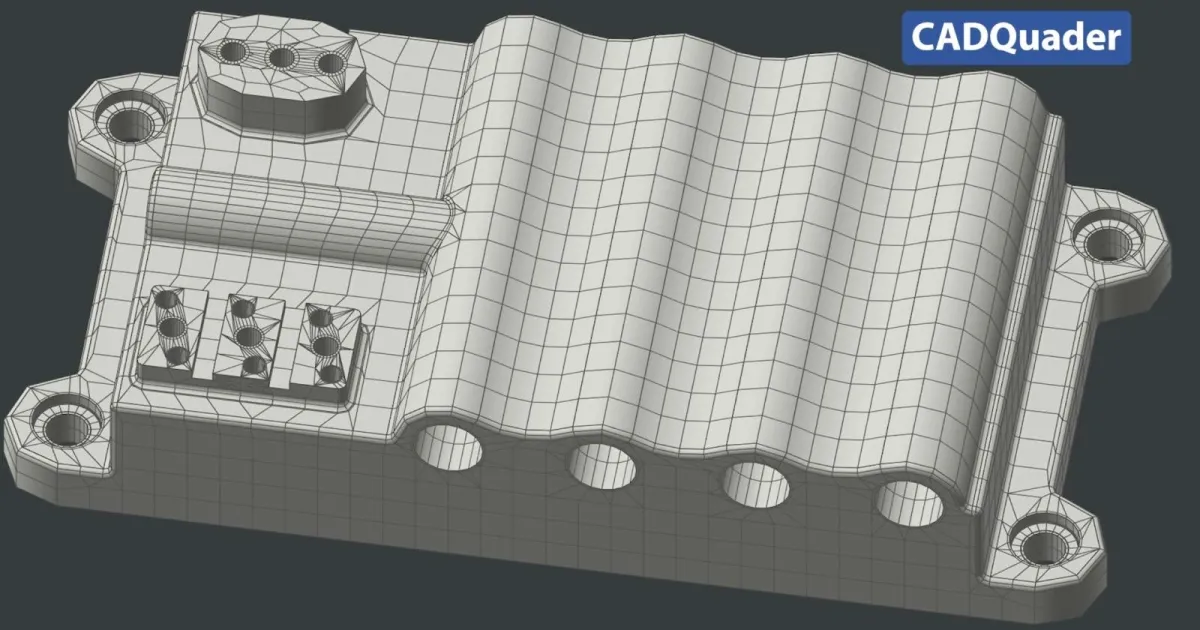
Pilgway, the company behind the 3D texturing and retopology tool 3DCoat, has opened a public beta of CADQuader, a new application that converts CAD models into polygon meshes made mostly of quads. It targets artists and developers who need engineering parts or hard-surface models inside a 3D pipeline without rebuilding them by hand.
What was announced
According to 80 Level, CADQuader takes STEP and IGES files and generates meshes that the outlet calls "nearly ready for production." The software offers several generation methods depending on the shape. It detects sharp corners and edges on its own and can place edge loops around circular features, which keeps the result easier to edit.
A dedicated Blender bridge sends meshes from CADQuader into Blender and brings the edited result back. Per 80 Level, polygons, placement, scale, UVs, normals and sharp edges survive that round trip. The official CADQuader site lists the current beta as version 2026.17, alongside a Blender Bridge 1.1 update.
The beta is free after a quick registration and includes 30 days of full access, including saving and exporting. After that period, users can still open models and generate meshes, but they need a license to save or export their work. Models are stored in the native .quader format and can be exported as OBJ.
Key details
- Developer: Pilgway, maker of 3DCoat
- Product: CADQuader, a CAD-to-quad-mesh converter
- Input formats: STEP and IGES
- Export formats: OBJ, plus the native .quader format
- Platforms: Windows x64 beta build, per the official download page
- Status: Public beta, version 2026.17
- Price/License: Free beta with registration; 30 days of full access, then a license is required to save or export
What it means for developers
- Less manual rebuilding: Engineering parts and hard-surface props can move into a sculpting or texturing workflow without being remodeled from scratch.
- Clean topology helps later steps: Quad-dominant meshes are generally easier to UV unwrap, subdivide and deform, so the output is more useful than a raw triangle mesh.
- A direct Blender loop: The bridge keeps UVs, normals and sharp edges intact, so an asset can move back and forth between the two tools.
- Plan around the trial window: Saving and exporting are free for only 30 days. Finish exports within that window or budget for a license before you need them.
- Verify before production: The official beta notice warns that it may contain bugs, incomplete features and unexpected mesh results, so check every generated mesh before it ships.
What is still unconfirmed
- The full release date and final feature set. The beta is described as still in active development.
- License prices and tiers. Neither source reviewed lists them.
- Platform support beyond Windows x64. The download page mentions only that build.
- Independent testing of mesh quality. So far the coverage is the developer's own page and this 80 Level report.
Sources
Cover image: © Pilgway (CADQuader).